
Copilot for business brings artificial intelligence into the Microsoft tools employees already use, including Word, Excel, Outlook, PowerPoint and Teams. It can help people draft content, summarize information, analyze data and complete routine work more efficiently.
However, purchasing licenses does not automatically produce better productivity. Businesses also need to understand how Copilot accesses company information, which employees should receive licenses, what security controls should be reviewed and how the tool will fit into existing workflows.
This guide explains what Microsoft Copilot for business is, what it costs, how companies use it and what to consider before implementing it. Some look for help implementing it through Microsoft Copilot consulting services or broader AI consulting services.
What Is Copilot for Business?

Copilot for business generally refers to Microsoft’s collection of AI tools designed for workplace use. The main product is Microsoft 365 Copilot, an AI assistant that works with Microsoft 365 applications and organizational data.
Depending on the application and license, Copilot can help employees:
- Draft, rewrite and summarize documents
- Review emails and prepare responses
- Summarize meetings and identify action items
- Analyze spreadsheets and explain trends
- Build presentations from existing information
- Search for information across approved company resources
- Create specialized AI agents for repeatable tasks
Unlike a standalone public chatbot, Microsoft 365 Copilot can use information from the Microsoft 365 environment to provide responses that are relevant to an employee’s work.
However, it does not give every employee unrestricted access to company data. Copilot generally works within the permissions already assigned to each user. That makes existing access controls an important part of Copilot readiness.
Microsoft Copilot vs. Microsoft 365 Copilot
The word “Copilot” now appears across several Microsoft products, which can make the options confusing.
Microsoft Copilot is Microsoft’s general-purpose AI assistant. It can help with web-based research, writing, brainstorming and other common tasks.
Microsoft 365 Copilot Chat provides AI chat designed for workplace use. Available features and access to organizational data depend on the user’s license and configuration.
Microsoft 365 Copilot integrates AI into applications such as Word, Excel, PowerPoint, Outlook and Teams. It can use the employee’s permitted work data to provide more relevant assistance.
Microsoft Copilot Studio allows organizations to build and manage customized AI agents that can support specific processes, information sources or departments.
Businesses should identify which version they need before purchasing licenses or planning a rollout.
How Does Microsoft Copilot for Business Work?
Microsoft 365 Copilot combines large language models with Microsoft 365 applications and the information a user is authorized to access.
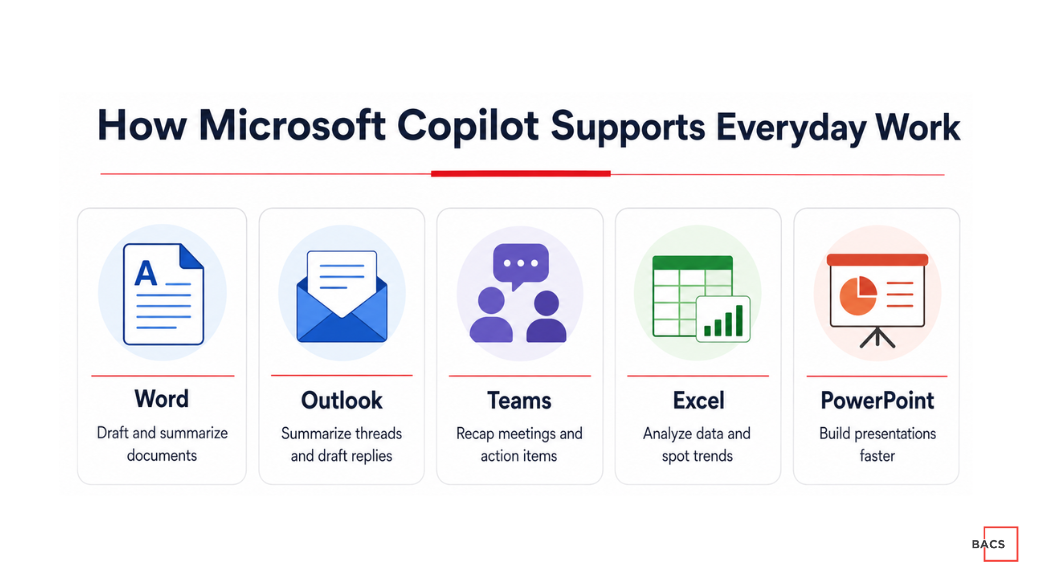
For example, an employee might ask Copilot to:
- Summarize an email conversation
- Identify action items from a Teams meeting
- Draft a report using information from an existing document
- Turn a Word document into a PowerPoint presentation
- Analyze a spreadsheet and highlight important changes
- Find information stored in approved Microsoft 365 locations
The quality of the response depends on several factors, including the employee’s prompt, the quality of the source material, data organization and user permissions.
Copilot can accelerate work, but employees should still review its output. Like other generative AI tools, it can misunderstand instructions, omit context or provide inaccurate information.
Copilot for Business Applications and Use Cases
The strongest Copilot use cases are usually specific, repeatable and connected to work employees already perform.
Copilot in Microsoft Word
Employees can use Copilot in Word to:
- Create a first draft
- Rewrite content for a particular audience
- Summarize long documents
- Extract key points
- Improve the organization of existing material
- Create FAQs or executive summaries
This can help teams move past the blank page, but the final document should still be reviewed for accuracy, tone and compliance.
Copilot in Microsoft Outlook
In Outlook, Copilot can help employees:
- Summarize long email threads
- Draft or revise responses
- Identify questions requiring an answer
- Adjust the length or tone of a message
- Prepare follow-up communications
This can be particularly useful for employees who manage large volumes of email.
Copilot in Microsoft Teams
Copilot can support meetings by helping users:
- Summarize discussions
- Identify decisions and unresolved questions
- Create action-item lists
- Catch up on a meeting
- Review different viewpoints expressed during a conversation
- Draft follow-up notes
Results depend on the meeting settings, transcript availability, licensing and organizational policies.
Copilot in Microsoft Excel
Copilot can assist with:
- Exploring business data
- Identifying patterns or outliers
- Explaining formulas
- Creating summaries and visualizations
- Suggesting ways to organize information
- Answering questions about a dataset
Excel results should be checked carefully, especially when the information will be used for financial, operational or strategic decisions.
Copilot in Microsoft PowerPoint
Employees can use Copilot to:
- Create an initial presentation
- Build slides from a document
- Summarize a longer presentation
- Rewrite slide content
- Suggest a presentation structure
- Add speaker notes
Copilot can speed up production, but users should review the presentation for accuracy, brand consistency and unnecessary content.
AI Copilots for Business Departments
AI copilots for business can support more than individual productivity. When aligned with clear processes, they can help departments improve recurring work.
Sales teams can prepare meeting summaries, draft follow-up messages and organize proposal content.
Marketing teams can create content outlines, repurpose approved materials and summarize campaign information.
Human resources teams can draft onboarding materials, summarize policies and organize common employee questions.
Finance teams can review spreadsheet information, summarize reports and explain changes in business data.
Operations teams can create process documentation, summarize project updates and identify missing information.
Leadership teams can prepare meeting briefs, review long documents and compare information from multiple approved sources.
Not every task is a good fit for AI. Organizations should prioritize use cases that can be reviewed by a person and avoid allowing Copilot to make sensitive decisions independently.
How Much Does Copilot for Business Cost?
Microsoft offers several Copilot products and licensing arrangements. Pricing depends on company size, the Microsoft 365 plan already in place and whether Copilot is purchased as an add-on or as part of a bundled subscription.
Microsoft currently lists Microsoft 365 Copilot Business as an option for organizations using qualifying Microsoft 365 business plans. It is designed for companies with up to 300 users. Larger organizations typically need to review Microsoft’s enterprise options.
Because pricing, promotions and plan availability can change, organizations should verify current costs on the official Microsoft 365 Copilot pricing page before making a purchasing decision.
The subscription price is also not the only cost to consider. A realistic budget may include:
- Security and permissions review
- Data cleanup
- Implementation planning
- Employee training
- Workflow development
- Adoption measurement
- Ongoing administration and support
A targeted rollout to selected roles can help a company test the value of Copilot before purchasing licenses for the entire organization.
Is Microsoft Copilot for Business Secure?
Microsoft provides business-focused security, privacy and compliance controls for Microsoft 365 Copilot. However, Copilot security still depends heavily on how the organization’s Microsoft environment is configured.
Copilot may surface information that a user already has permission to access. If employees have broader access than they should, Copilot can make that information easier to find.
Before deployment, businesses should review:
- User identities and account security
- SharePoint and OneDrive permissions
- Overshared files and folders
- Data retention policies
- Sensitive information labels
- Third-party application access
- Employee AI-use policies
- Logging and administrative oversight
Companies should also establish rules governing confidential information, regulated data and human review. BACS provides additional guidance through its AI security and governance services.
Benefits of Microsoft Copilot for Business
When it is applied to the right work, Copilot can provide several advantages.
Faster First Drafts
Copilot can help employees begin documents, emails, presentations and reports without starting from an empty page.
Quicker Information Review
Employees can summarize meetings, messages and lengthy documents before deciding where closer review is required.
More Efficient Microsoft 365 Workflows
Because Copilot works within familiar Microsoft applications, employees may not need to move information between several unrelated tools.
Better Access to Organizational Knowledge
When data is organized correctly and permissions are appropriate, Copilot can help employees find relevant information more quickly.
Support for Repeatable Work
Copilot and customized agents can assist with structured, recurring tasks that follow clear business rules.
The actual benefit depends on the use case. Businesses should measure outcomes such as time saved, adoption, output quality and process completion instead of assuming that license activity equals value.
Limitations of Copilot for Business
Microsoft Copilot also has important limitations.
- It can produce incorrect or incomplete answers
- Its output may sound confident even when it lacks context
- Poorly organized data can lead to weak results
- Excessive user permissions can create information exposure risks
- Employees may struggle without practical training
- Some workflows require additional configuration or integration
- Not every employee will generate enough value to justify a license
Copilot should support employee judgment, not replace appropriate review. High-impact decisions involving finance, legal matters, employment, security or regulated information should maintain human oversight.
How to Implement Copilot for Business
A successful rollout should begin with business needs rather than a company-wide license purchase.
1. Assess Your AI Readiness
Review your data, technology, security, leadership alignment and employee preparedness. The BACS AI Maturity Assessment can help identify early gaps.
2. Review Permissions and Data
Determine where sensitive information is stored, who can access it and whether shared resources contain outdated or overly broad permissions.
3. Select Specific Use Cases
Choose a small number of repeatable tasks connected to measurable business goals. Avoid vague objectives such as “use AI more.”
4. Choose a Pilot Group
Start with employees whose work aligns with the selected use cases. A focused pilot makes it easier to compare results and collect useful feedback.
5. Establish Governance
Define what information employees may enter, which outputs require review and how the company will monitor usage.
6. Provide Role-Based Training
Generic demonstrations are rarely enough. Employees need examples that reflect their responsibilities, applications and actual work. Practical Microsoft Copilot training can improve adoption and output quality.
7. Measure the Results
Track time saved, output quality, employee adoption and workflow improvements. Use the results to decide whether to expand, modify or discontinue each use case.
Is Microsoft Copilot Worth It for Your Business?
Microsoft Copilot may be worth the investment when a company already uses Microsoft 365, has clear use cases and is prepared to address permissions, governance and employee training.
It may not provide strong returns when licenses are assigned without a plan, employees do not know how to apply the tool or company information is difficult to find and poorly governed.
Before purchasing Copilot across the organization, ask:
- Which recurring tasks will Copilot improve?
- Which employees are the best candidates?
- What information will Copilot need?
- Are current access permissions appropriate?
- How will employees be trained?
- How will success be measured?
- What risks require human review?
The answers can help determine whether Copilot is ready to support the business or whether foundational work needs to happen first.
Getting Started with Copilot for Business
Copilot for business can help teams work more efficiently, but the technology delivers the most value when it is supported by secure data, practical use cases and employee adoption.
BACS IT helps organizations evaluate, implement and optimize Microsoft Copilot. Our Microsoft Copilot consulting services include readiness planning, security review, workflow development, training and ongoing optimization.
Instead of assigning licenses and hoping employees find value, businesses can build a structured Copilot strategy tied to measurable results.