Using Claude AI to analyze long documents can help businesses review policies, contracts, reports, SOPs, and other dense files more efficiently. But to get reliable results, teams need more than a simple upload and summary prompt. They need a structured workflow that protects accuracy, security, and decision-making.
This article focuses on what Claude AI for document analysis actually looks like inside a business. That includes the workflows, the prerequisites, where things break down, and what successful implementation really involves.
Businesses working with Claude AI often discover that the technology itself is only one piece of the puzzle.
Claude AI for Document Analysis: Overview of the Use Case
At a high level, Claude AI for document analysis is well suited for tasks such as:
- Reviewing long or complex documents
- Comparing multiple versions of policies, contracts, or procedures
- Extracting key themes, risks, or inconsistencies
- Turning dense information into summaries for leadership
Claude’s strength goes beyond basic summarization. It can reason across large documents and identify patterns, which makes it especially useful for organizations managing policies, SOPs, compliance documentation, or large client files.
That is the capability. How it fits into daily operations is where the real work begins.
How Claude AI for Document Analysis Works in a Business
For business teams, using Claude AI to analyze long documents can reduce manual review time, but it should not replace human judgment.
A typical workflow looks like this:
- Documents live in a shared system such as SharePoint, Google Drive, or another document management platform
- Teams are responsible for reviewing and approving content
- Reviews are manual, slow, and vary by reviewer
Once Claude is introduced, the workflow often becomes:
- Documents are pulled from a defined and trusted source
- Claude reviews them using a clear purpose such as comparing versions or identifying gaps
- Claude produces structured output like summaries, comparisons, or risk indicators
- A human reviews and makes the final decision
This is where organizations start to see real value. Claude speeds up analysis, but decision making remains human led.
What Is Actually Required
This is where many organizations struggle. Claude can only work as well as the environment around it.
Data Readiness
Claude needs access to the right documents:
- Current versions
- Clear naming conventions
- Known ownership
If teams rely on emailed attachments or outdated copies, results quickly lose value.
Document Structure and Consistency
Claude performs best when documents:
- Follow consistent formatting
- Use clear section headings
- Are text based rather than scanned or image heavy
Organizations often underestimate how much structure affects AI output.
Systems Involved
Claude does not operate in isolation. It works alongside existing systems that already house your knowledge. Successful use is usually part of broader AI Consulting efforts rather than isolated experimentation.
Where This Tends to Break
Most issues are not technology failures. They are process failures.
Common breakdowns include:
- Disorganized or duplicated documents
- Inconsistent prompts across teams
- No clear definition of what a good output looks like
- Lack of governance around sensitive data
- Treating AI output as final instead of directional
When these problems exist, Claude’s outputs feel unreliable and adoption slows.
Using Claude AI for Document Analysis in Practice
Successful implementation is rarely complex, but it is intentional.
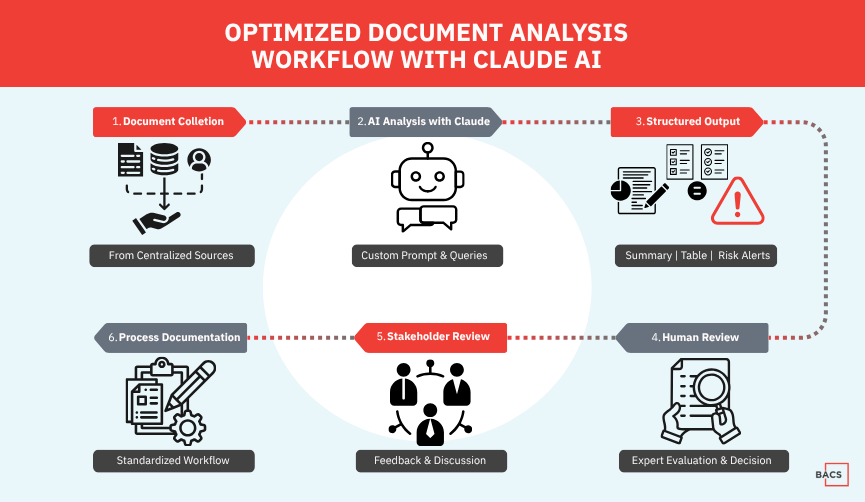
A realistic approach looks like this:
- Define a specific document related use case
- Agree on which documents are in scope
- Standardize prompts so results are consistent
- Pilot using real and current documents
- Review outputs with stakeholders
- Document the process so teams can repeat it
This structure is what separates experimentation from real operational use.
When Businesses Should Use Claude AI for Document Analysis
Claude AI for document analysis is a strong fit for organizations that:
- Manage large volumes of written content
- Perform repeated document reviews or comparisons
- Rely on knowledge focused teams like operations, compliance, or research
- Are willing to standardize processes before scaling AI
It is less effective for organizations that:
- Lack document ownership or version control
- Expect hands off automation without oversight
- Are not ready to address governance or data quality
Claude adds assistance, but it works best where foundational discipline already exists.
Where to Start
If you are unsure whether your documents, systems, or workflows are ready, jumping straight into AI tools often leads to frustration.
That is why many organizations begin with an AI Readiness Assessment. This helps clarify whether your data, processes, and governance are prepared and which AI use cases make sense to pursue now.