
The pros and cons of cloud migration are not the same for every business. Moving applications and data to the cloud may give your team more flexibility and reduce the need to maintain on-site hardware. It can also introduce new costs, security responsibilities, and dependencies on your Internet connection.
The right question is not “Should we move everything to the cloud?” It is “Which systems should move, which should stay, and how will we support them afterward?” Here is a practical look at the tradeoffs.
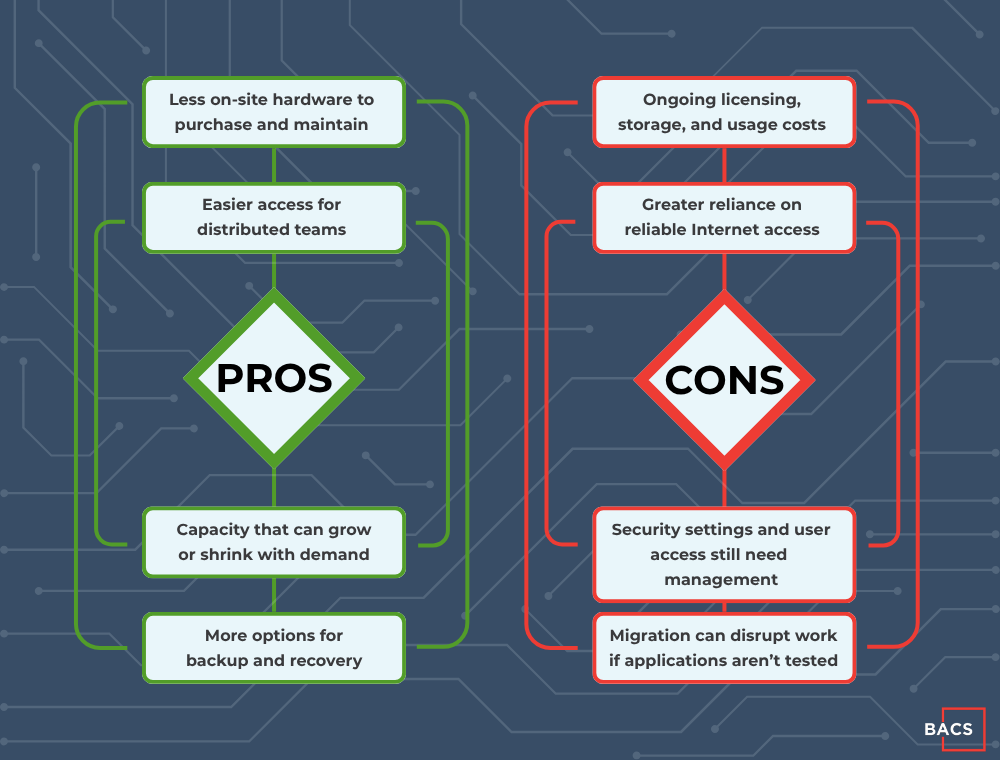
Cloud is not automatically cheaper, safer, or better than an on-premises setup. The outcome depends on what you move and how you manage it.
Pros Of Cloud Migration
1. Less Hardware to Maintain
Moving suitable workloads to the cloud can reduce the need to replace and maintain on-site servers. That may be especially useful when equipment is nearing end of life or a growing business needs capacity without expanding its server room. Your team still needs to manage software, access, backups, and vendors, but fewer physical systems may be its responsibility
2. Easier Access for Remote and Hybrid Teams
Cloud-based applications can make it easier for approved employees to work across offices and locations. This is valuable only when access is managed properly. Multifactor authentication, device protection, and timely onboarding and offboarding still matter.
3. Flexibility as Needs Change
A business opening a new location or adding employees may be able to expand cloud resources without purchasing another server. Conversely, it may be able to scale down resources it no longer uses. Actual flexibility varies by application and contract, so review licensing and usage terms before assuming costs will fall when demand does.
4. More Recovery Options
Cloud services can support off-site backups and disaster recovery, reducing reliance on a single office or piece of hardware. But storing data in the cloud is not the same as having a tested backup. Confirm what is protected, how often it is backed up, how long copies are retained, and how quickly critical systems can be restored.
Cons Of Cloud Migration
1. Monthly Costs Can Grow Unexpectedly
Cloud migration can shift spending from hardware purchases to recurring fees. Licensing, storage, data transfer, security tools, backup, and technical support can add up. Compare the full cost of your current environment with the estimated cost of the proposed cloud setup, then review cloud usage regularly after migration.
2. Connectivity Becomes More Important
If employees rely on cloud applications, an Internet outage can interrupt work. A business with a single connection or a location with unreliable service should examine connectivity and failover options before moving business-critical systems.
3. Security Is a Shared Responsibility
A cloud provider protects parts of its platform, but your business still needs to manage its data, user accounts, permissions, devices, and many security settings. The exact division depends on the service you use. Microsoft’s explanation of the cloud shared responsibility model is a useful starting point. A cloud move should include clear ownership of access controls, monitoring, and backup policies.
4. Some Applications May Not Move Cleanly
Older software, specialized equipment, large files, and integrations may depend on a local server or low-latency connection. Migrating without testing can slow down work or break a critical process. Inventory your applications and their dependencies before choosing what to move.
5. Compliance Needs Careful Review
Businesses handling regulated or sensitive information need to understand where data is stored, who can access it, how it is retained, and what records are available for audits. A provider’s compliance credentials do not automatically make your own configuration or processes compliant.
Should You Move to the Cloud, Stay On-Premises, or Use a Hybrid Setup?

After weighing the pros and cons of cloud migration, many businesses find that a mixed approach is more practical than an all-or-nothing decision.
- Cloud-first may fit applications that support distributed work and can be managed effectively in a cloud environment.
- On-premises may still make sense for specialized systems with hardware dependencies, strict performance requirements, or other constraints.
- Hybrid can keep certain systems local while moving others to the cloud, provided the connections between them are secure and reliable.
The best choice depends on your applications, budget, Internet reliability, security needs, and tolerance for downtime. Start with a network assessment and an inventory of the systems your employees use every day. Microsoft’s cloud migration planning guidance also emphasizes workload dependencies, migration order, testing, and rollback planning.
What Should You Check Before Migrating?
Before making a decision, ask your IT team or provider:
- Which applications can move without interrupting essential workflows?
- What will the total monthly cost include, beyond the base subscription?
- Will our Internet connection and network support the way employees work?
- Who will manage user access, security settings, monitoring, and backups?
- How will we test the migration, recover data, and roll back if needed?
These questions turn a broad technology debate into a practical business plan.
Cloud Migration Needs Ongoing Management
A successful migration does not end when the data moves. Cloud systems still need cost oversight, security reviews, backup testing, application support, and help for employees. That is where a managed IT partner can make a difference.
BACS IT helps businesses evaluate their environment, plan cloud services and migration, and provide ongoing managed IT support. If you are weighing the pros and cons of cloud migration for your organization, talk with BACS about what should move, what should stay, and what it will take to manage both.