
A network assessment gives your business a clear view of how your IT environment is performing, where security risks may exist, and what improvements should be prioritized. For growing organizations, this kind of visibility can help prevent downtime, slow systems, security gaps, and costly technology decisions.
Most businesses rely on their network every day, even if they do not think about it often. Employees need stable internet access, secure file sharing, reliable applications, cloud connectivity, and protected systems to do their jobs. When the network is not performing well, productivity can quickly suffer.
A network assessment helps uncover what is working, what is outdated, what may be vulnerable, and what needs attention before a small issue becomes a larger disruption.
What Is Included in a Network Assessment?
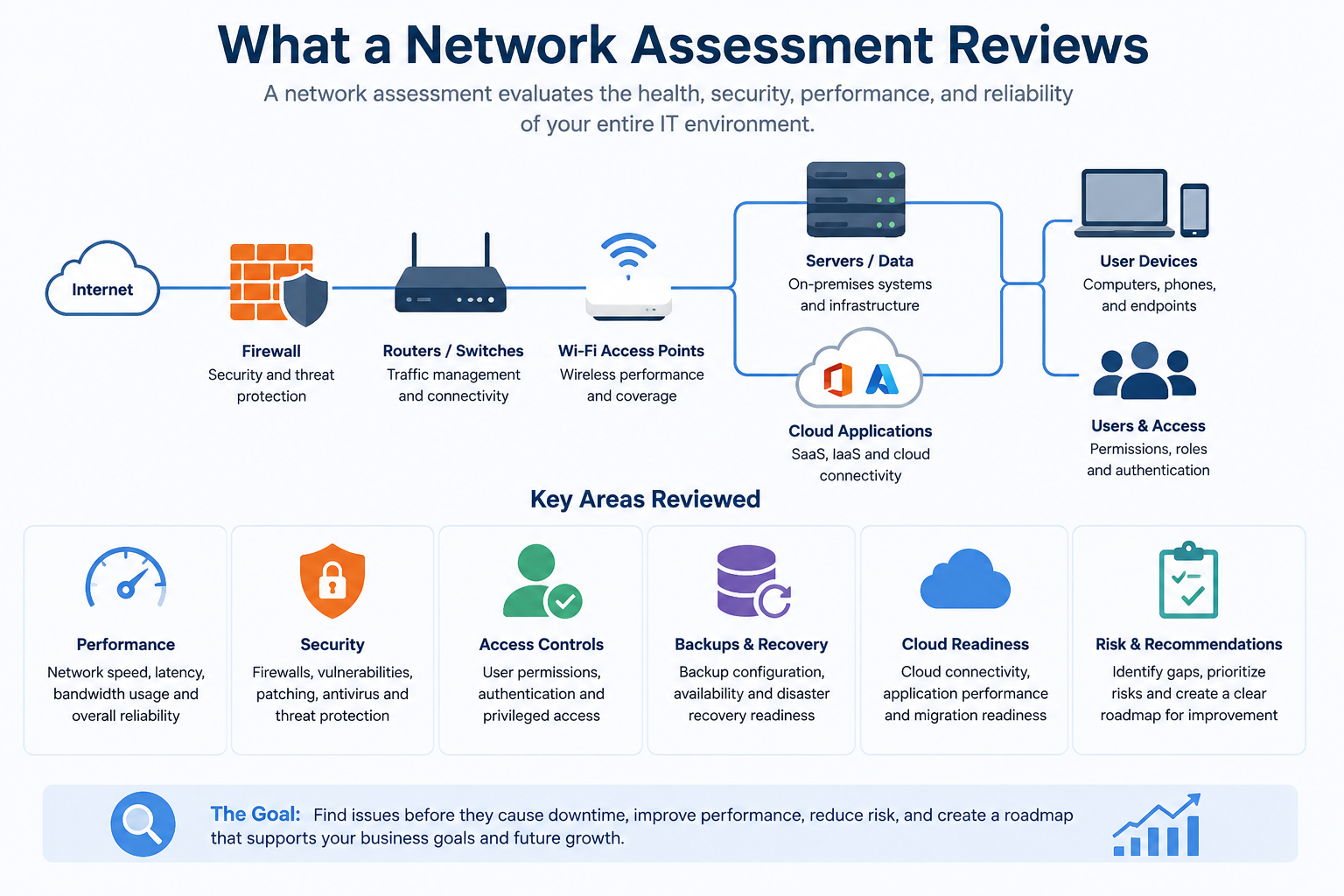
A network assessment reviews the health, security, performance, and structure of your IT environment. The goal is to identify risks, gaps, and opportunities for improvement across the systems your business depends on.
A network assessment may include a review of:
- Network speed and performance
- Firewalls and security configurations
- Internet connectivity and bandwidth
- Wi-Fi performance
- Servers, switches, routers, and access points
- Connected devices and endpoints
- User access and permissions
- Backup and disaster recovery readiness
- Cloud application connectivity
- Software, hardware, and licensing
- Documentation of current systems
- Potential security vulnerabilities
The exact scope can vary depending on the size of the business, the complexity of the environment, and the goals of the assessment. For some companies, the priority may be cybersecurity. For others, it may be performance, cloud readiness, compliance, or long-term IT planning.
Why Network Assessments Matter for Growing Businesses
As businesses grow, their technology environments often become more complex. New employees are added. More devices connect to the network. Cloud applications become part of daily operations. Remote and hybrid work create new access needs. Over time, systems that once worked well may no longer support the business effectively.
A network assessment helps identify these issues before they slow down operations or create unnecessary risk.
For example, a growing business may discover that outdated equipment is affecting performance, user permissions are too broad, backups are not properly configured, or unmanaged devices are connected to the network. Without an assessment, these issues can go unnoticed until they cause downtime, security concerns, or productivity problems.
A strong network assessment does more than point out technical problems. It helps business leaders understand where their IT environment stands today and what steps should be taken next.
Network Assessment vs. Network Audit
A network assessment and a network audit are related, but they are not always the same thing.
A network assessment looks at the overall health, performance, security, and reliability of your IT environment. It helps identify issues that may be slowing down your business, increasing risk, or limiting future growth.
A network audit is usually more formal and structured. It may focus on compliance, internal policies, documentation, controls, and whether the network aligns with specific business or regulatory requirements.
For many businesses, a network assessment is the right starting point. It provides a practical view of what is working, what is vulnerable, and what should be improved first. If the business has stricter compliance needs, a more formal audit may also be recommended.
Network Assessment Checklist for Businesses
A helpful network assessment should be practical, organized, and focused on business impact. While every environment is different, the following checklist can help companies understand what should be reviewed.
1. Network Performance
Network performance affects how quickly employees can access systems, applications, files, and cloud tools. A network assessment should review speed, bandwidth, latency, connectivity issues, and recurring slowdowns.
If employees regularly complain that systems are slow, video calls drop, or cloud applications take too long to load, performance should be a priority.
2. Network Security
Security is one of the most important parts of a network assessment. This may include reviewing firewall settings, access controls, endpoint protection, patching, password policies, and potential vulnerabilities.
A network assessment can help identify weak points that may increase the risk of unauthorized access, malware, phishing-related compromise, or data exposure.
3. Hardware and Device Inventory
Businesses should know what devices are connected to their network. This includes servers, workstations, laptops, printers, routers, switches, access points, phones, and other connected equipment.
An assessment can help identify outdated hardware, unknown devices, unsupported systems, or equipment that may need replacement.
4. User Access and Permissions
Not every employee needs access to every system. A network assessment should review user permissions to make sure employees have the access they need, without creating unnecessary risk.
This is especially important when employees change roles, leave the company, or use multiple applications across departments.
5. Wi-Fi and Connectivity
Unreliable Wi-Fi can create daily frustration for employees and visitors. A network assessment can review wireless coverage, access points, signal strength, guest networks, and areas where connectivity may be weak.
For businesses with offices, warehouses, clinics, labs, or multiple locations, Wi-Fi performance can have a direct impact on productivity.
6. Backup and Disaster Recovery Readiness
A network assessment should also consider whether the business can recover from data loss, downtime, cyber incidents, hardware failure, or natural disasters.
This may include reviewing backup frequency, backup storage, recovery processes, and whether backups are tested regularly.
7. Cloud and Application Connectivity
Many businesses now depend on cloud-based applications for communication, file storage, accounting, customer management, productivity, and security. A network assessment can help determine whether the current network supports those tools reliably and securely.
This is especially important before a cloud migration or major software change.
8. Documentation and IT Visibility
Many businesses do not have complete documentation of their IT environment. A network assessment can help create or update records of devices, configurations, vendors, licenses, systems, risks, and recommendations.
Better documentation makes it easier to troubleshoot problems, plan upgrades, and make informed decisions.
Signs Your Business Needs a Network Assessment
A network assessment can be useful at any stage, but there are certain signs that your business may need one sooner rather than later.
Your business may benefit from a network assessment if:
- Employees regularly report slow systems or connectivity issues
- Wi-Fi performance is inconsistent
- Your business has added users, devices, or locations
- You are preparing for a cloud migration
- You are concerned about cybersecurity
- You recently experienced downtime
- You are unsure whether backups are working properly
- Your hardware or software has not been reviewed recently
- You do not know what devices are connected to your network
- Your IT environment has grown without a clear plan
- You need better documentation for planning or compliance
- You want to understand where to prioritize your IT budget
These signs do not always mean something is seriously wrong. However, they do mean it may be time to take a closer look before problems become more expensive or disruptive.
How Network Assessments Support Cybersecurity
Cybersecurity is not only about having antivirus software or a firewall. It is about understanding where your risks are and reducing the chances of an incident before one happens.
A network assessment can also support broader cybersecurity planning by helping businesses identify assets, understand risk, and prioritize improvements, which aligns with guidance from the NIST Cybersecurity Framework.
For businesses facing growing cybersecurity concerns, a network assessment can provide a practical foundation for improvement. It helps answer important questions, such as:
- Who has access to sensitive systems?
- Are devices properly protected and updated?
- Are there unknown devices on the network?
- Are firewall and security settings configured correctly?
- Are backups available if systems are disrupted?
- Are employees able to work securely from different locations?
By identifying these risks early, businesses can make smarter decisions about security tools, policies, monitoring, and support.
How Network Assessments Support Cloud Readiness
Before moving more systems to the cloud, businesses need to understand whether their current network can support that transition. Cloud services depend on reliable connectivity, strong security, proper access controls, and clear planning.
A network assessment can help determine whether your environment is ready for cloud-based applications, remote access, data storage, or infrastructure changes. It can also identify bandwidth issues, security concerns, application dependencies, or backup gaps that should be addressed before migration.
This helps reduce the risk of slow performance, downtime, user frustration, or unexpected costs during a cloud project.
How to Prepare for a Network Assessment
Preparing for a network assessment does not have to be complicated. The goal is to give your IT provider or internal team enough context to understand your environment and your business priorities.
Before a network assessment, it can be helpful to gather:
- A list of known devices, systems, and applications
- Details about office locations, remote users, and cloud tools
- Recent examples of slowdowns, outages, or security concerns
- Information about internet providers and key vendors
- Current backup and disaster recovery processes
- Known compliance or security requirements
- Business goals that may affect IT planning
- Any existing network documentation
You do not need to have everything perfectly organized before starting. In many cases, the assessment itself helps uncover missing information and improve documentation.
What Happens After a Network Assessment?
A network assessment should lead to clear next steps. After the review is complete, your business should have a better understanding of current risks, performance issues, security gaps, and improvement opportunities.
The results may include:
- A summary of findings
- Prioritized risks and recommendations
- Performance improvement opportunities
- Security recommendations
- Backup and disaster recovery considerations
- Hardware or software upgrade suggestions
- Cloud readiness guidance
- Documentation of current systems
- A roadmap for future IT planning
The most useful assessments do not simply list problems. They help prioritize what matters most, what should be addressed first, and what can be planned over time.
Network Assessment Services for Bay Area Businesses
For Bay Area businesses, reliable technology is essential to daily operations. Whether employees work in the office, remotely, across multiple locations, or in a hybrid environment, the network needs to support secure and productive work.
Network assessment services can help businesses understand where their IT environment stands today and what changes may be needed to support future growth. This can be especially valuable for companies planning cloud projects, improving cybersecurity, expanding teams, reviewing compliance needs, or preparing for managed IT support.
A network assessment can also help businesses make better technology decisions. Instead of reacting to problems as they happen, leaders can use assessment findings to plan budgets, reduce risk, and improve long-term reliability.
Final Thoughts
A network assessment is more than a technical review. It is a business planning tool that helps organizations understand the health, security, and performance of their IT environment.
By identifying risks early, improving visibility, and creating a clear roadmap for next steps, businesses can reduce downtime, strengthen cybersecurity, and make smarter IT decisions.
If your business is experiencing slow systems, unreliable connectivity, security concerns, or uncertainty about future technology needs, a network assessment can help you understand what is happening and what to do next.